How Restaurants Can Update Menu Boards in Seconds with Digital Signage
Learn how restaurants can update digital menu boards in seconds using cloud-based digital signage. Manage menus, promotions, and specials remotely from anywhere while reducing printing costs and improving customer experience with DisplayManagerPro.
How Restaurants Can Update Menu Boards in Seconds
Restaurants move fast. Daily specials change, items sell out, prices get updated, and new promotions need to be displayed immediately. Yet many restaurants still rely on printed menus, USB drives, or manual screen updates that waste valuable time.
With cloud-based digital signage, updating your menu boards can take just a few seconds.
The Challenge with Traditional Menu Boards
Many restaurants face common problems:
- Staff must manually update TV screens.
- Printed menu boards become outdated quickly.
- Special promotions are difficult to launch instantly.
- Multiple restaurant locations require separate updates.
- Price changes create unnecessary printing costs.
These challenges not only waste time but can also lead to customer confusion and missed sales opportunities.
A Smarter Way to Manage Menu Boards
DisplayManagerPro allows restaurants to update menu boards remotely from a single dashboard.
Whether you're in the restaurant, at home, or managing multiple locations, you can control your screens from anywhere with an internet connection.
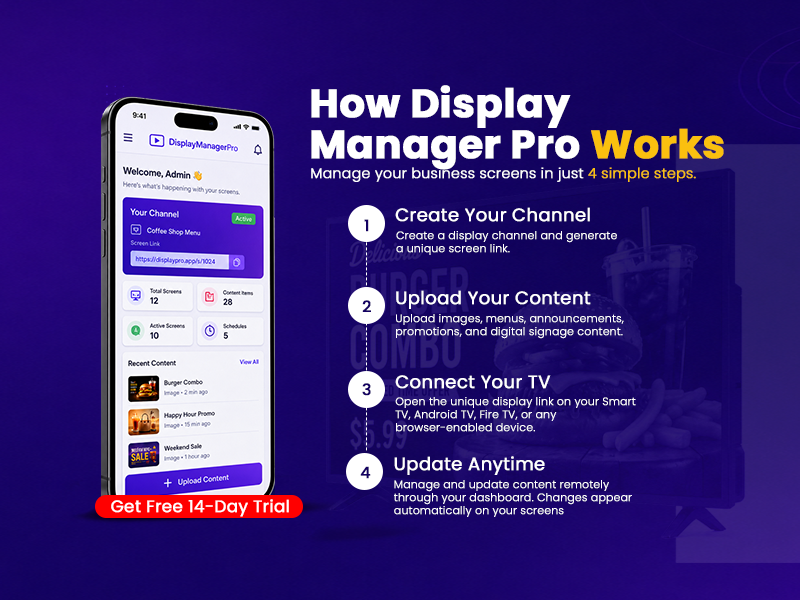
Step 1: Create Your Channel
Create a display channel and generate a unique screen link for your menu board.
Each TV or screen can have its own dedicated channel, making content management simple and organized.
Step 2: Upload Your Content
Upload:
- Food Menus
- Daily Specials
- Combo Deals
- Happy Hour Promotions
- Seasonal Offers
- Restaurant Announcements
Simply upload your images and arrange them in the order you want them displayed.
Step 3: Connect Your TV
Open the unique display link on:
- Smart TVs
- Android TVs
- Fire TVs
- Browser-Enabled Screens
Your menu board is now live and ready to display content.
Step 4: Update Anytime
Need to promote today's lunch special?
Want to remove a sold-out item?
Launching a weekend promotion?
Simply update the content through your dashboard, and the changes automatically appear on your screens.
No USB drives. No manual updates. No waiting.
Benefits for Restaurants
Save Time
Update screens in seconds instead of spending time replacing printed menus or manually updating devices.
Reduce Printing Costs
Eliminate the need for constant menu reprints when prices or items change.
Promote More Effectively
Launch promotions instantly across all your screens.
Manage Multiple Locations
Update screens across different restaurant branches from a single dashboard.
Keep Menus Accurate
Ensure customers always see the latest menu items, prices, and promotions.
Perfect For
- Restaurants
- Cafés
- Coffee Shops
- Fast Food Outlets
- Food Courts
- Bakeries
- Hotel Restaurants
- Takeaway Stores
Why Choose DisplayManagerPro?
DisplayManagerPro makes digital signage simple:
- ✅ Cloud-Based Management
- ✅ Unlimited Content Updates
- ✅ Mobile-Friendly Dashboard
- ✅ Automatic Screen Refresh
- ✅ Secure Hosting
- ✅ Multiple Screen Support
- ✅ No Technical Knowledge Required
Start Updating Menu Boards in Seconds
Modern restaurants need flexible and efficient ways to communicate with customers. With DisplayManagerPro, you can manage menu boards remotely, keep promotions up to date, and create a better customer experience.
Start your FREE 14-Day Trial today and manage every screen from anywhere.
DisplayManagerPro – Manage Your Business Screens in Just 4 Simple Steps.