How Hotel Owners Are Using ChatGPT to Design Menus (And Get Them Live in Minutes)
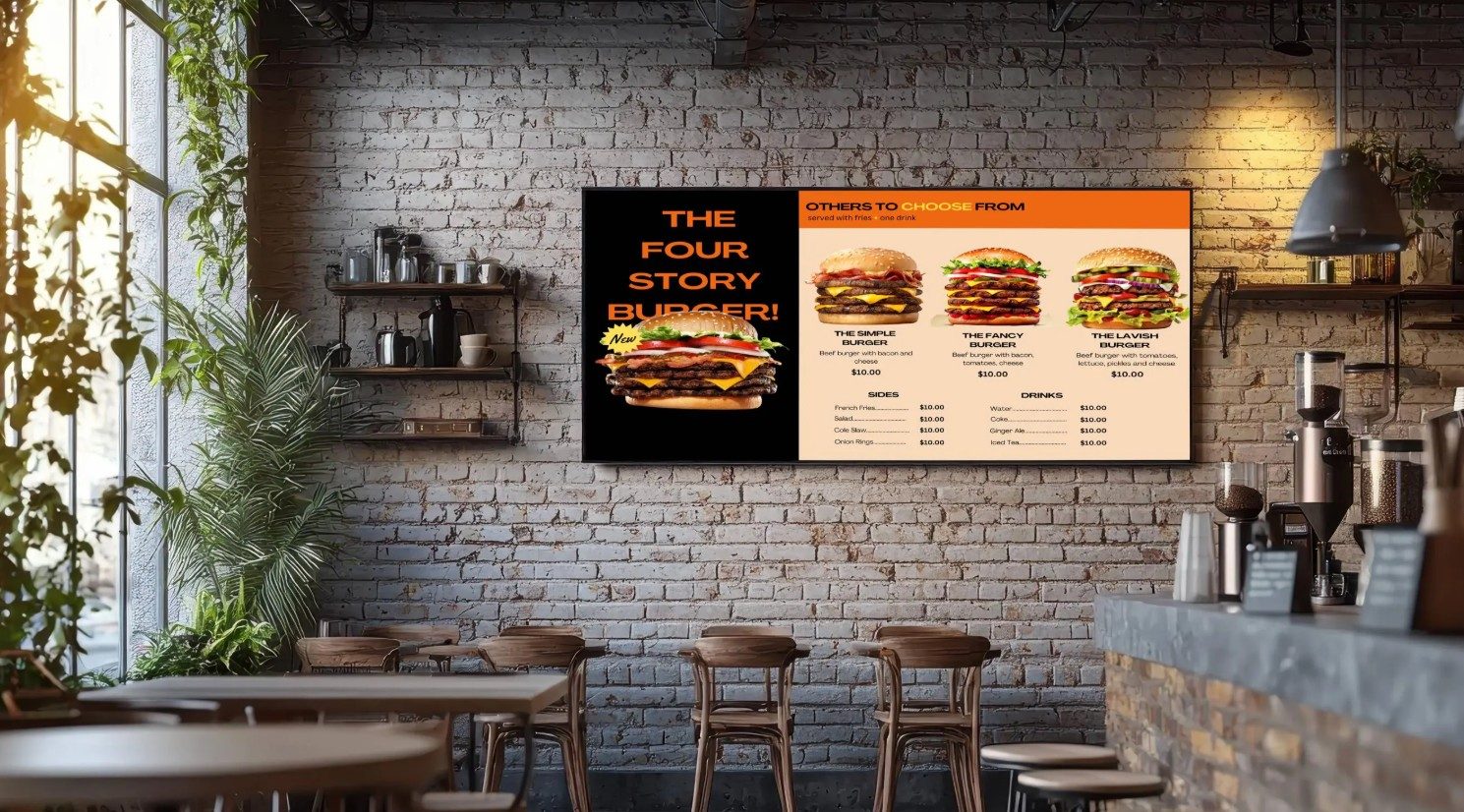
ChatGPT's latest update makes it surprisingly good at designing menu artwork — accurate text, clean layouts, no designer needed. Here's how hotel owners are using it to create menus, then publishing them instantly with Display Manager Pro.
How Hotel Owners Are Using ChatGPT to Design Menus — and Display Manager Pro to Get Them on Screen
Until recently, creating polished menu artwork meant hiring a designer, paying for stock photography, or settling for a template that looked like everyone else's. That's changed. With OpenAI's latest update to ChatGPT's image generation, hotel owners and hospitality managers can now design genuinely professional-looking menu graphics themselves — no design software, no designer, no waiting.
Here's what's new, what it means for menu creation specifically, and how to get that artwork live on your in-room or lobby screens in minutes using Display Manager Pro.
What Changed With ChatGPT's Image Generation
OpenAI released ChatGPT Images 2.0 in April 2026, and the upgrade matters specifically for menu design. Older AI image tools were notoriously bad at rendering text — ask for a menu and you'd often get garbled, invented words instead of real dish names and prices. That's no longer the case: the new model can generate a restaurant menu with accurate, legible text and pricing that looks ready to use straight away.
A few specific improvements are especially relevant for hotels and hospitality:
- Reliable text rendering — dish names, prices, and headers now render cleanly instead of as garbled placeholder text
- Multilingual support — accurate text rendering in languages including Japanese, Korean, Chinese, Hindi, and Bengali, useful for international hotel guests
- Consistent multi-image sets — you can generate a series of matching graphics (e.g. breakfast, lunch, and dinner boards) that share the same visual style
- Conversational editing — you can ask for changes in plain language ("make the background warmer," "increase the price text size") and it revises the same image rather than starting over
The base model is free to use. More advanced "Thinking" features, including multi-image batches and web-grounded accuracy, require a paid ChatGPT plan.
Using ChatGPT to Design Your Menu Artwork
The workflow is straightforward, even if you've never used an AI tool before:
- Describe the menu you want — be specific about your dish names, prices, and the visual style (e.g. "elegant breakfast menu, cream and gold colour scheme, serif font, matching our hotel's minimalist branding")
- Provide your exact text — for the most accurate results, give ChatGPT your dish names and prices verbatim rather than letting it invent them
- Refine conversationally — ask for adjustments in plain language until the layout, colours, and spacing feel right
- Export the final image — download the finished artwork ready to upload
One practical note: for anything with dense text or exact pricing, double-check the final output carefully before publishing. AI-generated text is far more reliable than it used to be, but it's still worth a quick proofread — a typo on a $13.50 ceviche is a lot more visible on a 55-inch lobby screen than it is on paper.
From AI-Designed Artwork to Live Screen in Minutes
This is where the workflow connects directly to your signage. Once you've got artwork you're happy with, getting it live across your property doesn't require a designer or IT support:
- Upload the image to your Display Manager Pro dashboard — no file conversion or technical formatting needed
- Push it to every screen at once — lobby displays, restaurant boards, and in-room screens all update simultaneously
- Swap menus by daypart automatically — schedule your AI-designed breakfast, lunch, and dinner artwork to rotate on their own
- Update instantly when something changes — a sold-out dish or last-minute price change goes live in seconds, from any device
For hotels managing multiple outlets — restaurant, bar, room service, conference catering — this means one person can design and publish a full set of professional, on-brand menu boards in an afternoon, without commissioning a single design job.
Why This Matters for Hotel Owners Specifically
Hotels juggle more menu touchpoints than almost any other hospitality business: breakfast buffet boards, restaurant menus, room service cards, bar menus, conference and event catering, seasonal promotions. Redesigning all of that through a traditional design process is slow and expensive. Pairing AI-generated artwork with a cloud signage dashboard collapses that entire process into something a single staff member can manage — no design team, no agency, no waiting on revisions.
Getting Started
If you're a hotel owner or manager curious about combining AI-designed menus with digital signage, take a look at what Display Manager Pro can do, browse how it's used across hospitality, or check common questions about getting set up.
Start your free 14-day trial — no credit card required.